Tour: Team Chat Built for Deep Work and Transparency

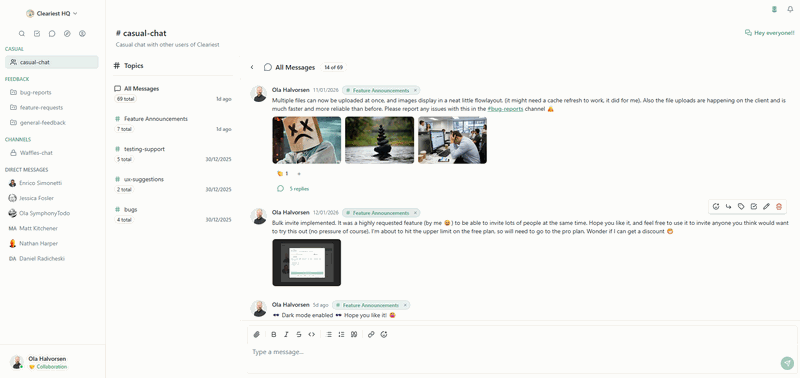
We've been shipping at an incredible pace, and I'm excited to share the features that make Cleariest fundamentally different from other team chat tools. These aren't just bells and whistles, they're intentional design choices that protect your ability to do deep, meaningful work while staying connected with your team.
Deep Work Mode & Focus Mode: Reclaim Your Attention
The star of the show is our dual focus protection system. We've built three distinct modes that recognize different levels of concentration:
Deep Work Mode
When you activate Deep Work Mode, the entire interface transforms. A calming gradient overlay takes over your screen, notifications are completely silenced, and you see an inspiring quote to keep you centered. Your team sees that you're in deep work, and the system batches all messages until you emerge.

Deep Work Mode shows your elapsed time and displays curated quotes from Cal Newport, Buddha, and other thought leaders on focus and mindfulness.
Here's what makes it special:
- Visual transformation: Beautiful, slowly rotating gradient backgrounds (slate-purple, gray-blue, indigo-violet) create a distraction-free environment
- Curated quotes: Inspiring messages from Cal Newport, Bruce Lee, Buddha, and others to keep you motivated
- Time tracking: See exactly how long you've been in deep work without breaking your flow
- Emergency override: Still reachable for true emergencies (more on this below)
Focus Mode
Sometimes you don't need complete isolation, you just need to concentrate on a specific project. Focus Mode lets you select up to 3 channels that are relevant to your current work. Everything else fades into the background.
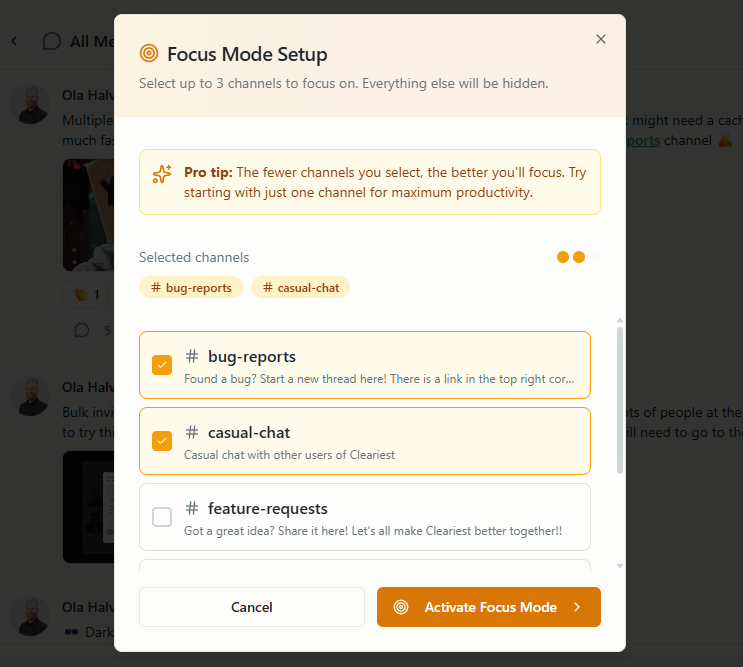
Choose up to 3 channels for your current focus session. Only these channels will send you notifications.
Perfect for when you're working on a specific feature, coordinating with a small team, or need to stay plugged into critical channels while ignoring the rest.
Collaborative Mode (Default)
Collaborative Mode is your default state, where all features are available and you're actively taking part in public, transparent communication within your company. Every conversation, every decision, every question and answer becomes part of your organization's growing knowledge base.
In Collaborative Mode, you're not just chatting, you're building institutional memory. New team members can search through channel history to understand why decisions were made. Colleagues can find answers to questions that were already asked and answered. Knowledge compounds instead of being lost in private DMs or forgotten email threads.
The beauty of this three-mode system is that you can shift between them as your work demands:
- Collaborative Mode: Default state for active participation and knowledge sharing
- Focus Mode: When you need to concentrate on specific projects with minimal distractions
- Deep Work Mode: When you need complete isolation for complex, cognitively demanding work
Each mode respects your current needs while maintaining your connection to the team in a healthy, sustainable way.
AI-Powered Focus Session Summaries
Here's where it gets really good. The traditional approach to team chat punishes you for going into deep work, when you emerge, you're flooded with notifications and unread messages. We flip this entirely on its head.
When you exit Deep Work or Focus Mode, Cleariest uses OpenAI's GPT-4 to generate an intelligent summary of what happened while you were away. Instead of drowning in 50+ unread messages, you get:
- Overview: A one-sentence summary of the session
- Key Activity: Important decisions, discussions, and updates from each channel
- You Need To: Action items that specifically require your attention or response
- Mentions: Any @mentions are highlighted with context
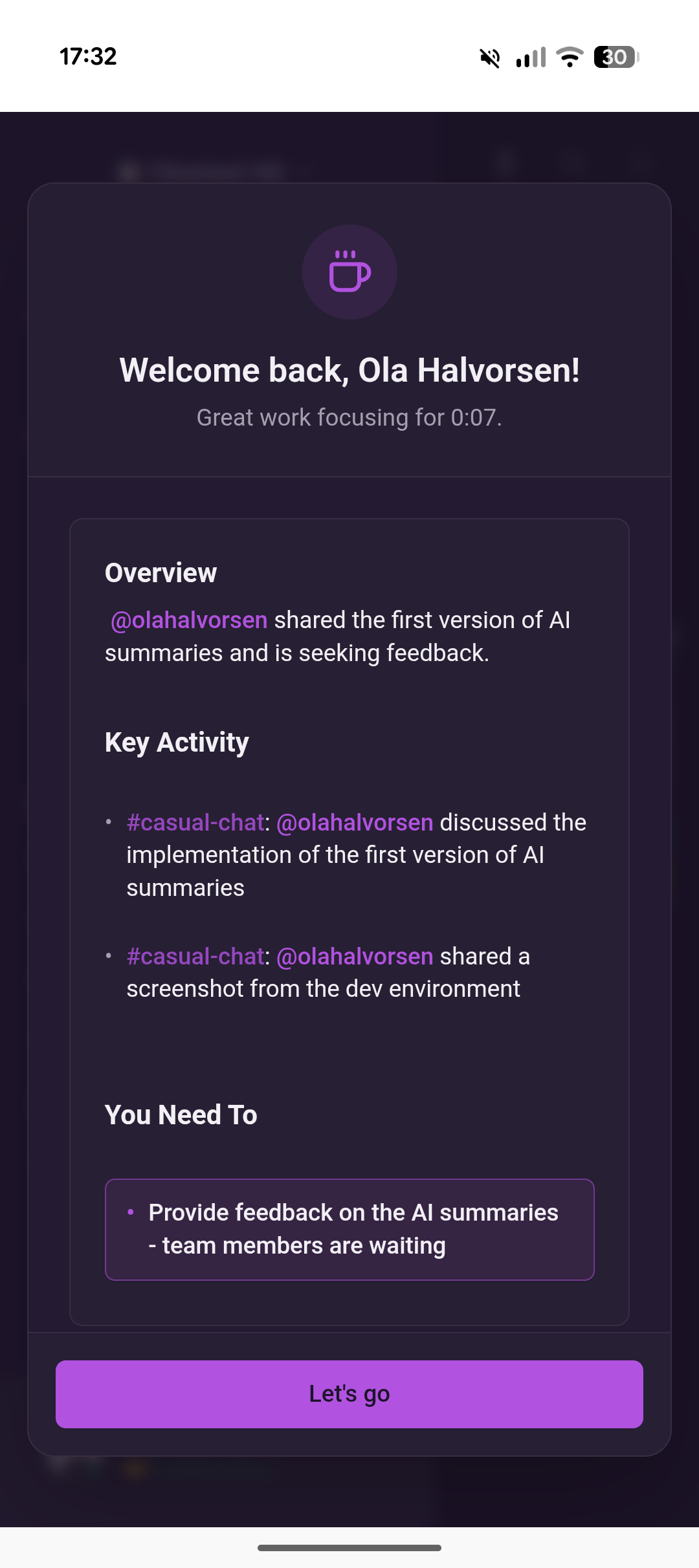
AI summaries are structured to help you quickly understand what happened and what needs your attention, using real channel names and usernames from your workspace.
The AI is smart enough to extract real channel names and usernames from the messages, so you're not reading generic placeholders, you get actual, actionable information. It identifies what you personally need to respond to versus just FYI updates.
Coming soon: We're working on a "Mark All as Read" button that appears when we're confident the AI summary captures everything important. This will let you acknowledge the summary and move on without anxiety about missing critical information. Finally, deep work is possible without the punishment of notification overload when you return.
Themes: Personalize Your Workspace
Not everyone works the same way, and your environment matters. We've added six beautiful theme options beyond the standard light and dark modes:
- Ocean: Calming blues and aquamarine tones for a serene workspace
- Sunset: Warm oranges and purples for creative energy
- Forest: Natural greens and earth tones for grounded focus
- High Contrast: Maximum readability for accessibility needs
- Midnight: Deep purples and dark blues for late-night sessions
- Coffee: Rich browns and warm neutrals for cozy productivity
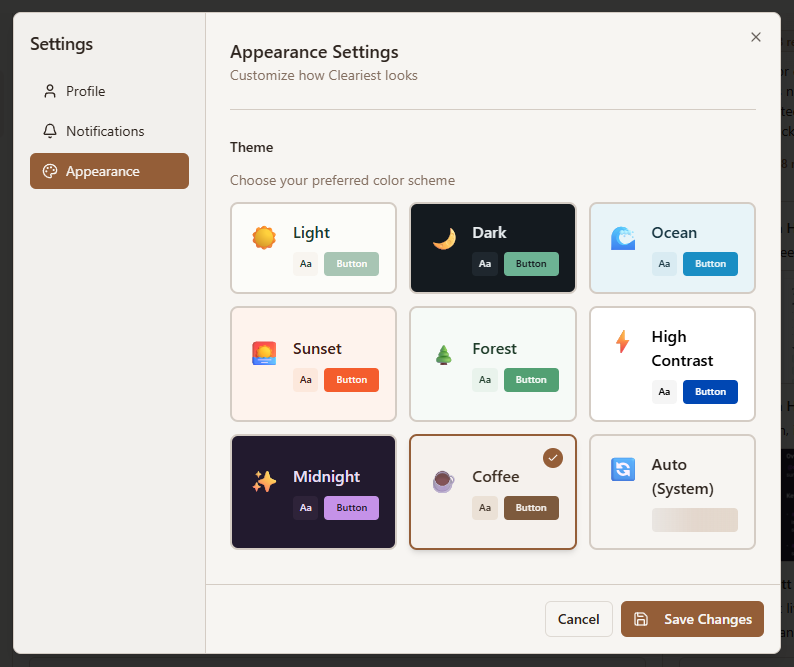
Choose a theme that matches your mood, your work style, or your environment. All themes are carefully designed with proper contrast and accessibility in mind.
Each theme is carefully crafted with attention to contrast, readability, and visual harmony. They're not just color swaps, each has its own personality while maintaining Cleariest's calm, mindful aesthetic.
Gentle Nudges Toward Transparency
Private channels and DMs exist in Cleariest, we're not naive about the need for sensitive conversations. But we don't make them the default or celebrate them.
Instead, we use thoughtful design to encourage public communication:
- Public channels are easier to create and more discoverable
- Search works better across public channels
- Private channels are available but require deliberate action
- DMs are present but de-emphasized in the UI
- File uploads are disabled in private channels to encourage public knowledge sharing
The goal isn't to eliminate privacy, it's to make transparency the path of least resistance. When teams default to public channels, knowledge spreads naturally, decisions have context, and new team members can get up to speed by reading channel history.
Powerful Search Across Everything
A transparent workspace is only valuable if you can find things. Our search isn't just fast, it's intelligent and comprehensive.
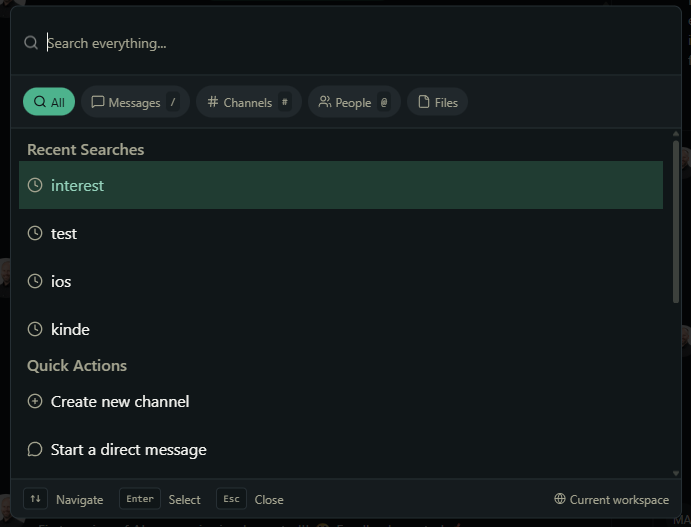
The command palette (CTRL+K | ⌘+K) provides instant access to everything: messages, channels, people, and files, all in one unified interface.
You can search across:
- Messages: Full-text search with snippets and context
- Channels: Find channels by name or description
- People: Search by username, display name, or email
- Files: Search uploaded documents, images, and videos by filename
The search supports filtering by author, channel, or date range. Results show message snippets with your search terms highlighted, making it easy to find exactly what you need. And it's all accessible through the command palette with ⌘+K, no need to navigate away from what you're doing.
Emergency Messages: When You Really Need Someone
Deep Work Mode is designed to protect focus, but we're not naive, sometimes things are genuinely urgent. When you @mention someone who's in Deep Work or Focus Mode, Cleariest shows you a thoughtful dialog explaining their current state.
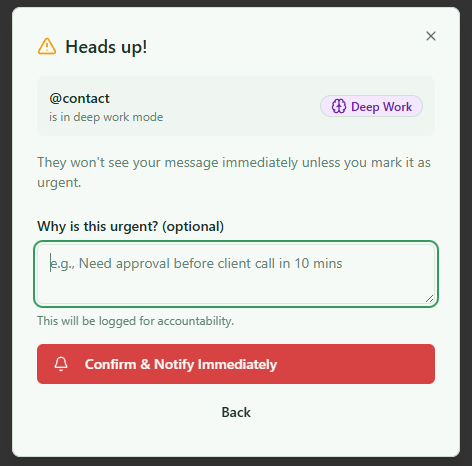
Before sending an emergency notification, you're asked to provide a reason. This small friction ensures interruptions are thoughtful and necessary.
You can choose to:
- Send normally: They'll see it when they exit focus mode
- Send as emergency: Push through with a notification, but you provide a reason
If you choose emergency, the person in deep work gets:
- A browser notification (even if their window is minimized)
- An alert sound (a high-pitched tone to grab attention)
- A visual alert in their Deep Work overlay
Emergency overrides are logged for workspace transparency, this isn't meant for casual use. The small friction of explaining why something is urgent makes people think twice, ensuring only truly important interruptions break someone's flow.
Simple Task Manager
Not everything in chat deserves to stay in chat. Sometimes you read a message and think "I need to do this later." Our lightweight task manager lets you convert any message into a task with one click.
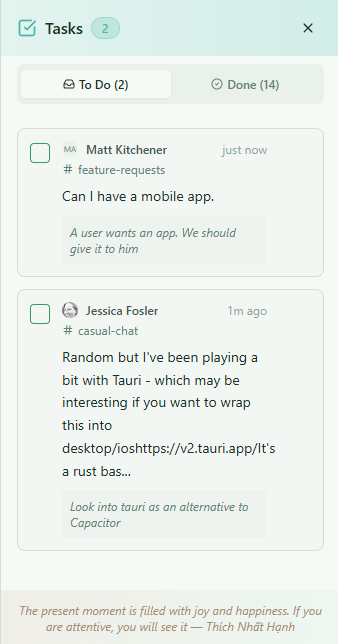
Tasks preserve the original message content and author, making it easy to remember context when you're ready to take action.
Tasks show:
- The original message content
- Who sent it and when
- Which channel it came from
- Optional notes you can add
Click a task to jump directly to the original message for full context. Mark it complete when you're done. It's deliberately simple, we're not trying to replace dedicated project management tools. This is for the small, personal tasks that emerge from conversations.
File Uploads: Documents, Videos, Images & More
Share what you need to share, when you need to share it. File uploads support:
- Images: JPEG, PNG, GIF, WebP with automatic thumbnail generation
- Videos: MP4 files with inline playback
- Documents: PDF, Word documents, plain text files
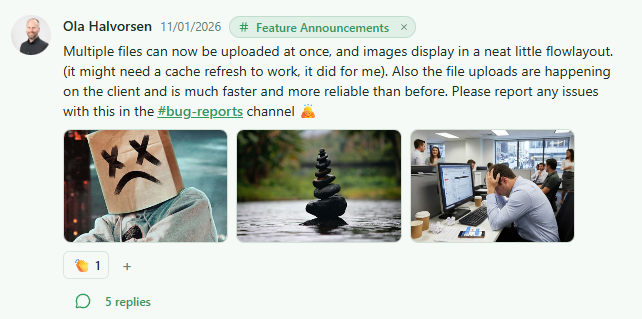
Files render appropriately: images show inline with thumbnails, videos play directly in the message, and documents show with clear download options.
Uploads are stored securely in Cloudflare R2 (S3-compatible storage), with automatic thumbnail generation for images. All plans support up to 25MB per file with some plans allowing up to 100MB. Files are searchable, trackable, and count toward your workspace storage quota.
Importantly, file uploads are disabled in private channels. This encourages teams to share knowledge publicly where others can benefit and search for it later.
Mindful UI & Box Breathing
Finally, the underlying philosophy that ties everything together: mindfulness.
You won't find red notification badges in Cleariest. No urgent pings. No FOMO-inducing unread counts. Every design decision is filtered through the question: "Does this create anxiety or reduce it?"
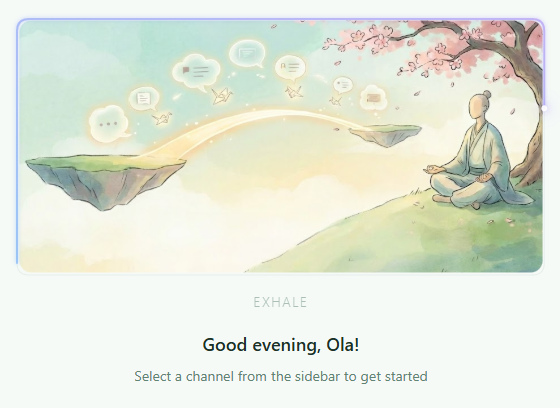
The welcome screen features a subtle box breathing animation, a gentle reminder to breathe and center yourself before diving into work.
When you first open Cleariest or clear your current view, you see our welcome screen with a box breathing animation. It's not forced meditation, it's a gentle, ambient reminder that your breath is always there as an anchor. Four seconds in, hold, four seconds out, hold. The animation traces a subtle path around your screen while displaying the phase of the breath.
The entire interface uses calm colors, thoughtful spacing, and smooth animations. Transitions are deliberate. Loading states are graceful. Errors are helpful, not aggressive. It's designed to feel like a tool that respects you, not one trying to manipulate your attention.
The Philosophy Behind It All
These features aren't random additions, they're expressions of a core belief: knowledge work requires deep focus, and tools should protect that focus, not destroy it.
The traditional team chat model punishes deep work. Every minute you spend in flow state, notifications pile up. When you emerge, you're hit with anxiety-inducing red badges and a backlog that demands immediate attention. You can't win, either you ignore chat and miss important things, or you stay plugged in and never achieve deep work.
Cleariest rejects that trade-off. With Deep Work Mode + AI Summaries, you can:
- Enter deep work with confidence
- Stay there as long as you need
- Emerge to a helpful summary instead of notification hell
- Quickly identify what needs your attention
- Optionally mark everything as read and move on
For the first time, deep work is possible without consequences.
What's Next
We're not done. On the roadmap:
- Mark all as read after AI summary: Trust the AI captured everything important
- Scheduled focus blocks: Plan your deep work sessions in advance
- Focus analytics: Track how much time you spend in each mode
- Team focus status dashboard: See when your team is focused vs. available
- Integration with calendar: Auto-enter focus mode during blocked calendar time
- Message markers: Flag messages that need follow-up, require decisions, or document important outcomes to make critical conversations easy to find later
We're building the communication tool we wish existed when we were drowning in Slack notifications. A tool that respects your time, protects your attention, and trusts that transparency makes teams stronger.
If you're tired of constant interruptions and want to reclaim your ability to do deep, meaningful work, try Cleariest. Get a 14-day free trial — no credit card required.
Deep work is possible again. Let's make it happen.
About Ola Halvorsen
Ola is the founder of Cleariest. He works in software development and has seen firsthand how lack of deep work impacts productivity and well-being, and how transparent, public collaboration strengthens teams and builds lasting knowledge.
Ready to Protect Your Focus?
Join teams who are doing their best work with Cleariest. 14-day free trial on all plans — no credit card required.
Start Using Cleariest FreeRelated Reading
Deep dive into how Deep Work Mode protects your focus time.
AI Chat SummariesStay informed without reading every message.
Reduce Notification OverloadPractical strategies to tame notification noise.
Slack Alternative for Deep WorkWhy focus-driven teams are choosing Cleariest.