Focus Mode for Teams: Protect Deep Work Time
Individual focus tools like Do Not Disturb were never designed for teams. When your culture still expects instant replies, personal focus settings create guilt — not productivity. Cleariest's Deep Work Mode gives your entire team structural permission to focus, with built-in safeguards so nothing truly urgent falls through the cracks.
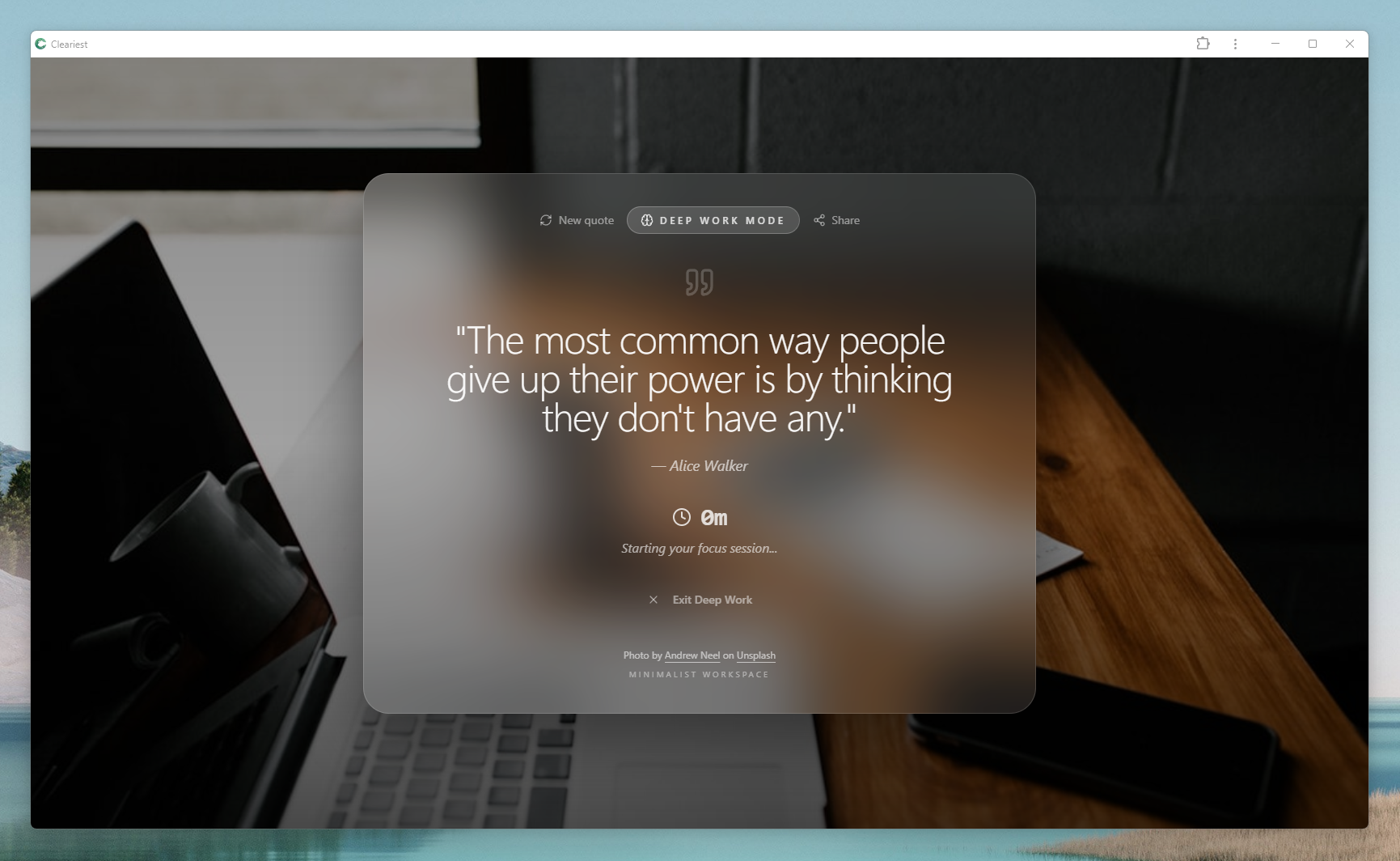
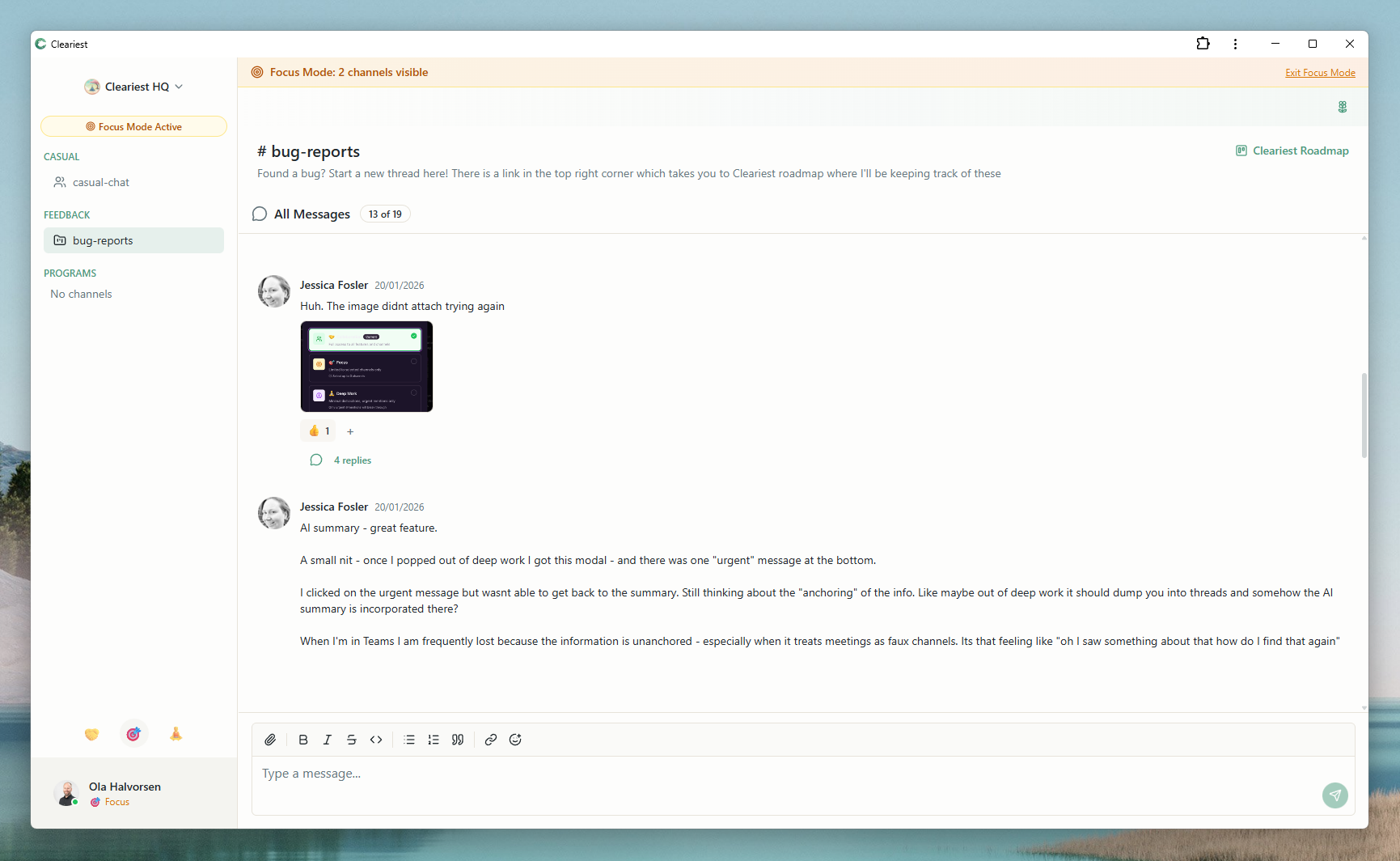
Screens from Cleariest's compare pages showing the focus-first controls described in this guide.
Why Individual Focus Tools Fail Teams
Every modern operating system and chat app offers some version of Do Not Disturb or Focus Mode. Apple, Android, Slack, and Microsoft Teams all let you mute notifications on your own device. So why is notification overload still the number one complaint among knowledge workers?
The answer is culture. Individual focus tools only work when the surrounding culture respects them. If your team expects real-time responses — if leaving a message unread for 30 minutes triggers a follow-up DM or a tap on the shoulder — then turning on DND just creates anxiety. You know the messages are piling up, and you know people are waiting. The focus tool becomes a source of stress rather than relief.
There is a deeper structural problem too. Individual DND is invisible to the sender. When a colleague messages you while you are in focus mode, they have no idea you are unavailable. They do not know whether you are ignoring them, busy, or just slow to reply. This ambiguity breeds resentment and erodes trust over time.
Teams need structural focus protection — not individual willpower. The tool itself must make focus visible, create friction for non-urgent interruptions, and give everyone on the team the same permission to protect their deep work hours. That is the difference between a personal setting and a team-wide system. Cleariest was built around this distinction from day one, and it is why teams switch from Slack when focus becomes a priority.
How Deep Work Mode Works in Cleariest
Deep Work Mode in Cleariest is not a simple mute button. It is a structured focus session designed to protect your concentration while keeping your team informed. Here is how it works:
One-click activation with a timer
Activate Deep Work Mode with a single click and choose your session length — anywhere from 25 minutes to 4 hours. The timer is visible to you and to your teammates, so everyone knows when you will be available again. No guessing, no awkward follow-ups.
All notifications paused automatically
The moment you enter Deep Work Mode, all chat notifications are paused — no pings, no badges, no unread counts ticking up. Your interface shifts to a calmer state, removing the visual noise that pulls attention away from your work. This is not just DND; it is a deliberate UX change that reinforces focus.
Messages batched into a digest
While you focus, messages keep flowing in the background — but they are organized and batched. When your session ends, you receive a single digest summarizing what happened, organized by channel and priority. Instead of scrolling through 47 individual messages, you scan a structured summary and decide what needs your attention. This pairs powerfully with AI-powered chat summaries for even faster catch-up.
Emergency interrupts require a reason
Truly urgent situations do happen. Deep Work Mode includes an emergency interrupt that allows a teammate to break through — but only after they provide a written reason. This small friction filter is critical. It stops casual "quick question" interruptions while ensuring genuine emergencies get through immediately.
Focus status visible to the whole team
When someone is in Deep Work Mode, their status is visible across the workspace. Teammates see a clear indicator and the remaining time. This visibility normalizes focus — when people see that three colleagues are currently in deep work, it reinforces that focused time is valued, not frowned upon.
Building a Focus Culture: A Practical Framework
Having the right tool is necessary but not sufficient. You also need cultural practices that support deep work. Here is a practical four-step framework for building a focus-first culture, whether you are a startup or a scaling team.
-
1
Establish team focus blocks. Agree on shared focus windows — for example, 9:00–11:30 AM every weekday. During these blocks, the entire team activates Deep Work Mode. No meetings, no non-urgent messages. This is sacred time. Start with three sessions per week and expand as the habit takes hold.
-
2
Define urgency levels explicitly. Most teams have no shared definition of what counts as urgent. Create a simple three-tier system: urgent (production is down, customer data at risk), important (needs attention today), and normal (can wait until focus block ends). Only urgent items justify an emergency interrupt. Write this down and share it with the team. Consider using async standups to handle important-but-not-urgent items without breaking focus.
-
3
Make focus visible and celebrated. Use Cleariest's workspace-wide focus indicators to normalize deep work. When the team can see who is focusing, it removes the stigma of being "offline." Celebrate focus streaks in retrospectives. Recognize people who protect their deep work time consistently — not just those who respond fastest.
-
4
Measure and iterate. Track focus block completion rates, interruption counts, and team output during focus windows. Review these metrics monthly. If completion rates are low, investigate why — are meetings creeping in? Are urgency definitions too loose? Continuous measurement keeps the culture honest and helps you improve over time.
Culture change does not happen overnight, but it compounds quickly. Teams that commit to this framework typically see a measurable reduction in interruptions within two weeks and a noticeable improvement in output quality within a month.
Deep Work Metrics: Measuring What Matters
You cannot improve what you do not measure. Here are the three metrics that matter most for evaluating your team's focus health:
Interruption count per focus block
Track how many times each focus session is interrupted — whether by emergency overrides, self-interruption (ending a session early), or external factors. A healthy target is fewer than one interruption per 90-minute block. If your team averages three or more, your urgency definitions are too loose or your culture has not fully shifted yet.
Focus block completion rate
What percentage of started focus sessions run to completion without being cut short? This is the clearest signal of whether your team's focus culture is working. Below 60% completion means something structural is preventing sustained focus — investigate meeting schedules, on-call rotations, and manager expectations. Aim for 80% or higher.
Output quality during focus time
Quantitative metrics only tell part of the story. Pair them with qualitative assessment — do code reviews show fewer bugs in work done during focus blocks? Are design deliverables more polished? Are documents more thorough? Survey your team monthly on perceived output quality during focused versus unfocused time. The self-reported difference is often dramatic and validates the investment in focus culture.
Focus Mode Implementation Checklist
Use this checklist to roll out team-wide focus mode systematically. Each item builds on the previous one:
- Audit current interruption patterns — have each team member log interruptions for one full day
- Define urgency tiers with the team (urgent, important, normal) and document examples of each
- Choose shared focus block times — start with three 90-minute blocks per week
- Set up Cleariest Deep Work Mode for every team member and walk through the activation flow
- Communicate the focus policy to stakeholders and adjacent teams who may be affected
- Run a two-week pilot — track interruption count, completion rate, and subjective output quality
- Hold a retrospective to review pilot data and adjust urgency definitions or block times as needed
- Expand to daily focus blocks and integrate with your team's async communication practices
Who This Is For — and Who It Is Not For
Focus mode helps if
- Your engineering team cannot sustain focus blocks longer than 30 minutes
- Designers, writers, or analysts report constant interruptions
- Individual DND settings create guilt or anxiety instead of focus
- Your team's output quality has declined alongside increased chat volume
- You want to protect deep work without disconnecting from your team entirely
Might not apply if
- Your team's primary work requires real-time responsiveness (live support, trading desks)
- You have a very small team (2-3 people) with minimal chat volume
- Your interruptions come from in-person conversations, not digital notifications
- Your organization requires constant availability for compliance or regulatory reasons
Related Reading
Frequently Asked Questions
How long should a Deep Work session last?
Deep Work sessions in Cleariest can be set from 25 minutes to 4 hours. Cal Newport recommends 90-minute blocks as an ideal length for sustained concentration. If you are new to focused work, start with shorter 25 or 50-minute sessions and build up as the habit strengthens.
What happens to messages during Deep Work Mode?
All messages are batched and held during your Deep Work session. When the session ends, you receive a single digest summarizing everything that happened — organized by channel and priority. Nothing is lost; it is simply delivered on your schedule instead of interrupting your flow.
Can someone still reach me in an emergency?
Yes. Cleariest includes an emergency interrupt option that allows a teammate to break through Deep Work Mode. However, they must provide a written reason for the interruption. This friction ensures emergencies get through while casual messages wait.
Does focus mode work for non-engineering teams?
Absolutely. Any team that needs sustained concentration benefits from focus mode — designers working on mockups, writers drafting content, analysts building reports, or strategists doing research. Deep work is not exclusive to engineering; it is essential for any knowledge work.
How is this different from just closing Slack?
Closing your chat app means you miss everything — including genuinely urgent items. Deep Work Mode in Cleariest filters urgent from non-urgent automatically. Emergencies can still reach you with a reason, while everything else is batched for later. You stay protected without being disconnected.
Give Your Team Permission to Focus
Deep Work Mode is not a feature — it is a philosophy. Cleariest gives your team the structural protection they need to do their best work, without missing what matters.