Cleariest vs Microsoft Teams: Simpler Team Chat

Cleariest vs Microsoft Teams

An honest comparison. No spin. We'll tell you when Teams is the right choice (spoiler: it often is for enterprises).

Last updated: January 2026 | Based on public information from microsoft.com

The Honest Truth

Choose Teams if you need:

  • Microsoft 365 integration (Word, Excel, SharePoint, etc.)
  • Your organization already uses Microsoft ecosystem
  • Enterprise-grade compliance & security
  • Built-in video conferencing (it's actually quite good)
  • Copilot AI integration

Choose Cleariest if you're frustrated by:

  • Teams' confusing permission system
  • Hidden public channels (seriously, where are they?)
  • Complex setup requiring IT admin for everything
  • No focus mode or deep work features
  • Notifications you can't truly control

See Cleariest in Action

Simple setup, powerful features, zero permission headaches.
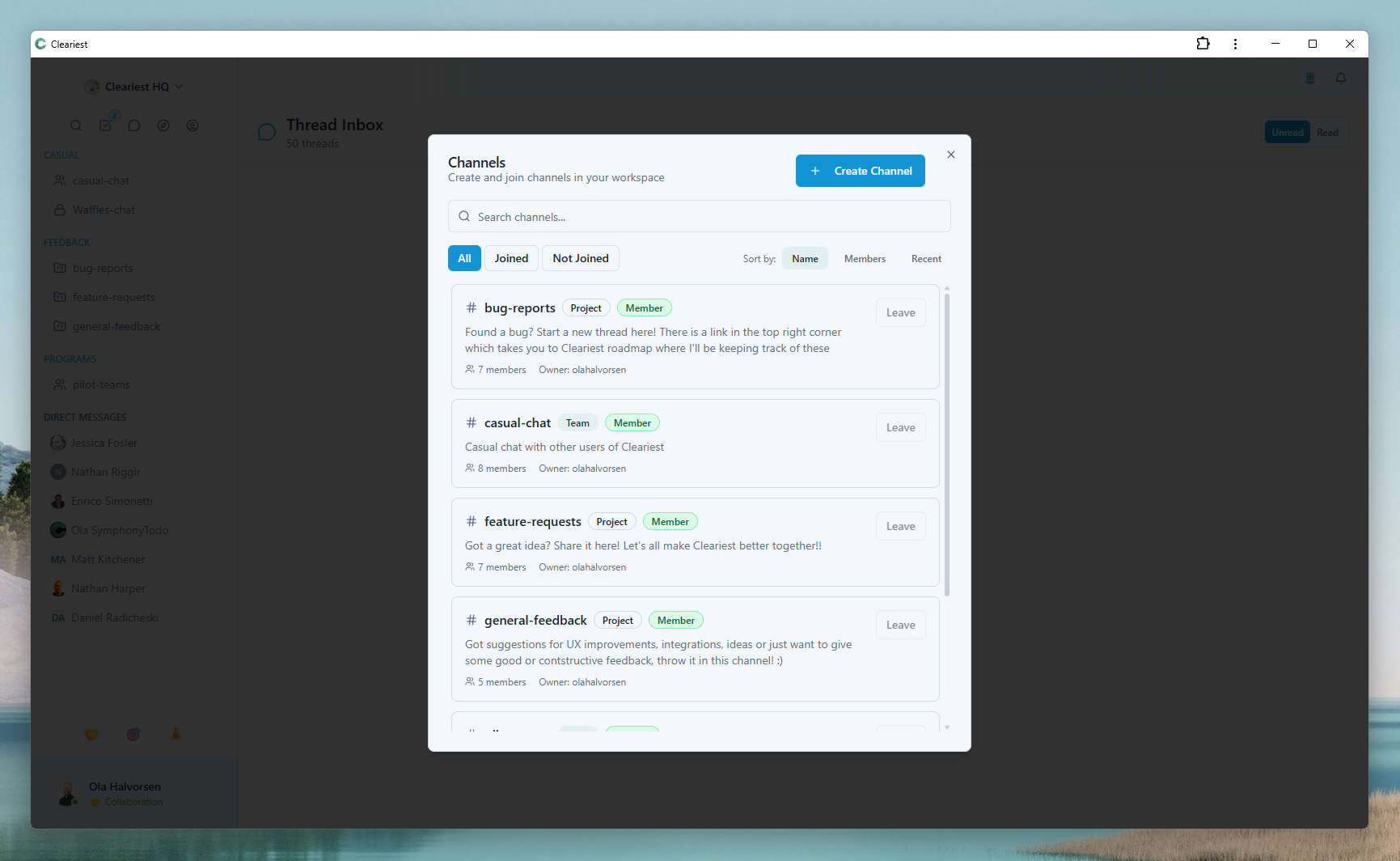
Channel discovery in Cleariest

Public Channels Front & Center

Unlike Teams' hidden public channels, ours are right where they should be.
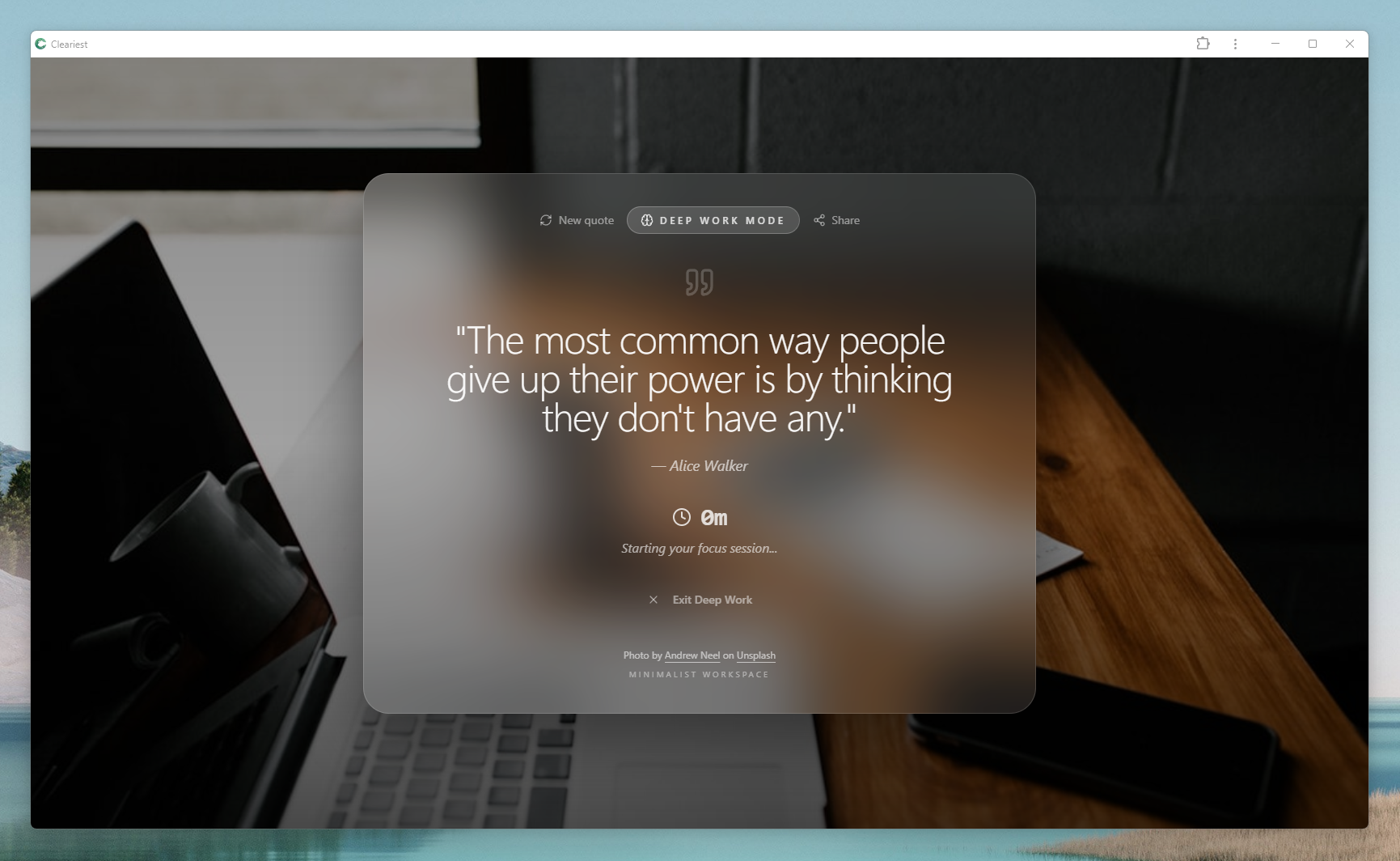
Deep Work Mode in Cleariest

Deep Work Mode

True notification control. No complex settings. Just one click.
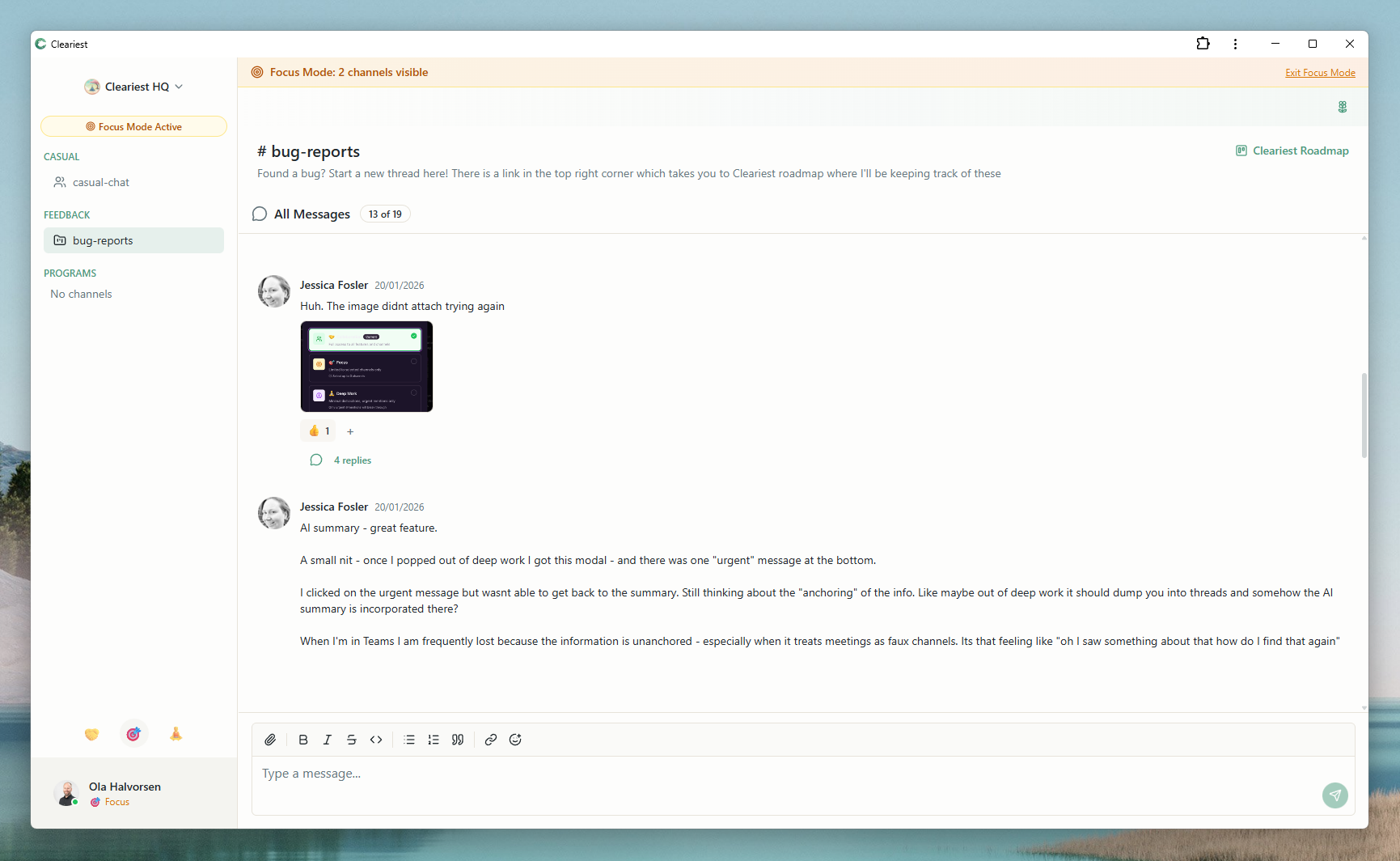
Focus Mode in Cleariest

Focus Mode

Limit to 3 channels. No permission management required.
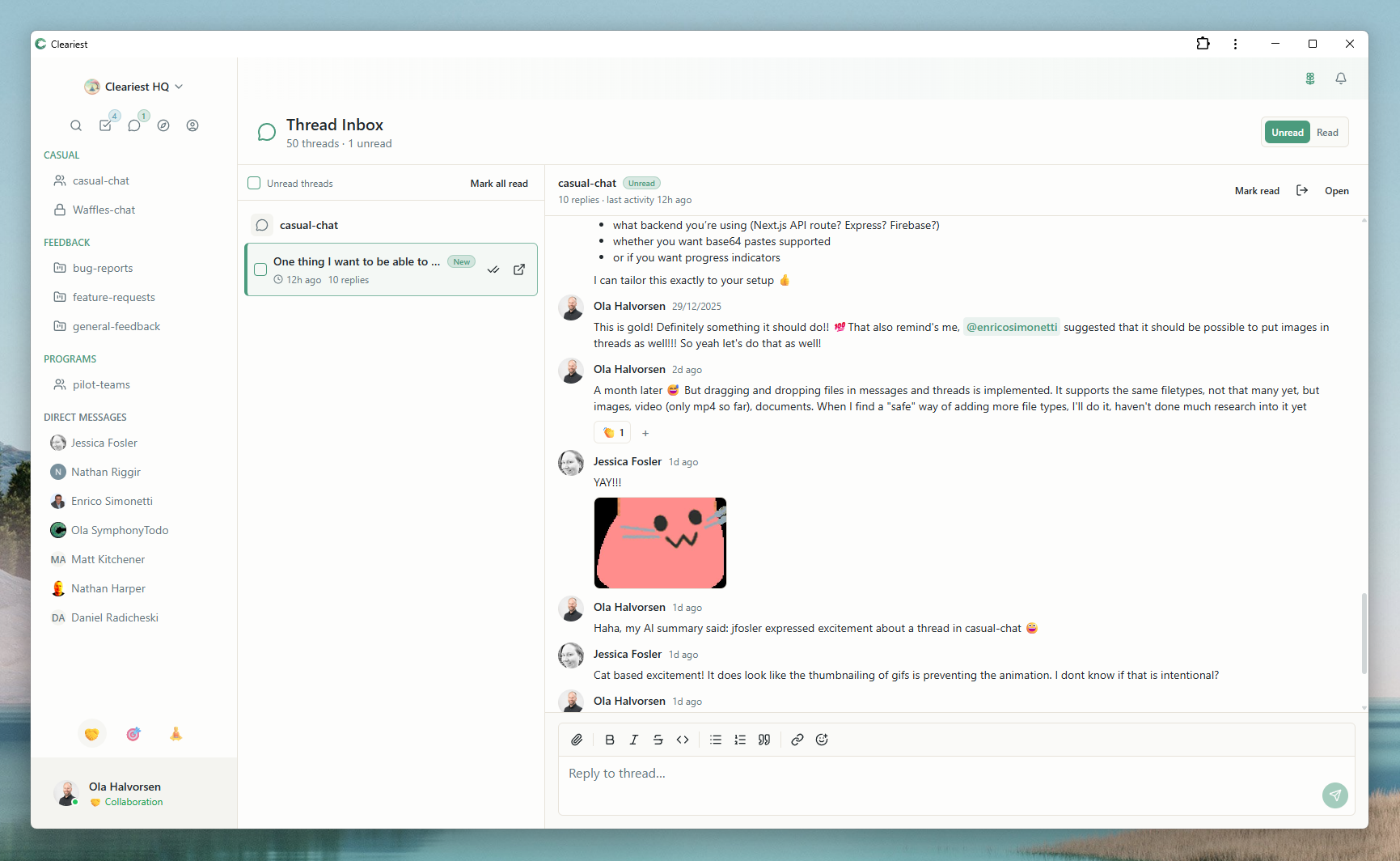
Thread Inbox in Cleariest

Thread Inbox

Stay on top of conversations without complex notification settings.

Start Free Trial - No Credit Card Required

No IT admin needed. Set up in 5 minutes. 14-day free trial on all plans, no credit card required.

No credit card
14-day free trial
Upgrade anytime

Let's Be Real About Teams

Teams is powerful. But that power comes with complexity that drives people crazy.

Permission Hell

Creating a team? You need permissions. Adding a channel? More permissions. Want to share a file? Better check your SharePoint permissions. And your OneDrive permissions. And your Teams permissions...

Hidden Public Channels

Public channels exist. But good luck finding them. They're buried in settings, require organization-wide team setup, and most users have no idea they can discover other conversations happening across the company.

IT Admin Required

Want to customize anything? Create an organization-wide team? Change security settings? You'll need your IT admin. Every. Single. Time. It's designed for IT control, not team autonomy.

Feature-by-Feature Breakdown

No sugarcoating. Where Teams wins, we say so.

Feature Cleariest Microsoft Teams Winner
Setup & Ease of Use
Setup complexity
Simple (5 min signup)
Complex (requires Microsoft 365 setup)
Cleariest
Permission management
Simple workspace-level roles
Complex (Teams + SharePoint + OneDrive)
Cleariest
Create channels/teams
Any user, instantly
May require admin approval
Cleariest
Public channel discovery
Front and center by design
Hidden, requires org-wide team
Cleariest
User learning curve
Low (familiar chat UI)
Moderate to high
Cleariest
Core Messaging
Real-time messaging
Yes (SignalR)
Yes
Tie
Message threads
Yes
Yes (recently improved)
Tie
File sharing
Yes (Cloudflare R2)
Yes (SharePoint integration)
Tie
Search functionality
Basic full-text search
Advanced (searches files too)
Teams
Mindfulness & Focus
Deep Work Mode
Yes (batch notifications)
No (only Do Not Disturb)
Cleariest
Focus Mode (channel limits)
Yes (choose 3 channels max)
No
Cleariest
Notification control
Granular (by mode and channel)
Basic (but notifications still leak)
Cleariest
Integrations & Ecosystem
Microsoft 365 integration
No
Native (Word, Excel, SharePoint, etc.)
Teams
Third-party apps
Basic (API, webhooks)
1,000+ apps
Teams
AI / Copilot
Basic AI summaries
Microsoft 365 Copilot (advanced)
Teams
Video & Meetings
Built-in video calls
Not yet (roadmap)
Yes (excellent quality)
Teams
Meeting recordings
N/A
Yes (with AI transcription)
Teams
Enterprise Features
SSO / SAML
Business plan
Yes (Azure AD)
Tie
Compliance certifications
Not yet (early stage)
Extensive (HIPAA, SOC 2, ISO, etc.)
Teams
Admin controls
Simple workspace settings
Comprehensive (maybe too much?)
Depends on needs

What Are You Actually Paying For?

This isn't apples-to-apples. Teams is an enterprise collaboration suite. Cleariest is a focus-first communication tool. Different purposes, different value.

BUYING: FOCUS & SIMPLICITY

Cleariest

You're paying for protection from interruption, not features. A tool that helps your team stay focused instead of constantly switching context.

What $6/user gets you:
  • Deep Work Mode - Notifications batched until you're ready
  • Public-first transparency - No permission anxiety
  • 5-minute setup - No IT admin needed
  • Mindful UI - No red badge stress
What you're NOT paying for:
  • • Video conferencing (use Zoom/Meet)
  • • Microsoft Office integration
  • • 1,000+ app marketplace
  • • Complex enterprise features
BUYING: ENTERPRISE ECOSYSTEM

Microsoft Teams

You're paying for the Microsoft 365 ecosystem, not just chat. Full integration with Office, SharePoint, enterprise security, and compliance.

What $12.50/user gets you:
  • Office apps - Word, Excel, PowerPoint desktop versions
  • Video conferencing - Built-in, works well
  • Enterprise security - Compliance certifications
  • Deep integrations - SharePoint, OneDrive, etc.
What you're also paying for:
  • • Complex permission system
  • • IT admin setup requirements
  • • Training time for your team
  • • Microsoft ecosystem lock-in

The Decision Framework

Choose Teams if:
  • • Your team needs Microsoft Office apps (Word, Excel, PowerPoint)
  • • You require enterprise compliance (HIPAA, SOC 2, etc.)
  • • Video conferencing needs to be tightly integrated
  • • You're willing to manage complexity for ecosystem benefits
Choose Cleariest if:
  • • Your team's productivity suffers from constant interruptions
  • • You value transparency and simple permissions over enterprise features
  • • You want your communication tool to protect focus time, not fight it
  • • You're willing to use separate tools for video calls and documents

Cleariest's Unique Value

We're not trying to replace Teams feature-for-feature. We're solving a different problem: helping knowledge workers protect their attention in an age of constant interruption.

What we excel at:
  • • Batching notifications for deep work
  • • Transparent, public-first channels
  • • Mindful UI without anxiety triggers
  • • Setup in minutes, not days
What we don't do:
  • • Video conferencing (use Zoom/Meet)
  • • Office suite integration
  • • Enterprise compliance certifications
  • • Replace your entire Microsoft stack

Our Honest Recommendation

Stick with Teams if:

  • You're already deep in the Microsoft ecosystem
  • You need Word/Excel collaboration in chat
  • Video conferencing is critical to your workflow
  • You need enterprise compliance certifications
  • Your IT team loves configuring things

Try Cleariest if:

  • Teams' permission complexity drives you insane
  • You want public channels that people can actually find
  • You value deep work over constant availability
  • You want a tool that's simple to set up and use
  • You're starting fresh (not migrating)

Common Questions

Can Cleariest replace Microsoft Teams completely?

Not for everything. Teams is a full Microsoft 365 hub with video calling, SharePoint, and Office integration. Cleariest focuses specifically on team chat done right — with mindfulness features, public-first channels, and deep work protection. If chat is your main use case and you want less complexity, Cleariest is a great fit. If you need the full Microsoft suite, Teams may be more appropriate.

Is Cleariest easier to set up than Teams?

Yes, significantly. Teams requires Microsoft 365 licenses, Azure AD configuration, and often IT involvement for proper setup. Cleariest takes about 2 minutes — sign up, create a workspace, invite your team. No IT department needed.

Does Cleariest have video calling?

No, and that's intentional. We believe dedicated tools (Zoom, Google Meet) do video calling better than bundled solutions. Cleariest focuses on what we do best: mindful asynchronous and real-time text communication with deep work protection.

What makes Cleariest different from just using Teams channels?

Cleariest channels are public by default, meaning anyone in your workspace can find and join them. Teams buries channels inside "Teams" containers with complex permissions. Cleariest also adds Deep Work Mode (notification batching), AI-powered chat summaries, and mindfulness nudges — features Teams doesn't offer.

Is Cleariest free?

Cleariest includes a 14-day free trial on all plans — no credit card required. Plans start at $29/month per workspace (Calm), $79/month (Flow), or $199/month (Deep). All core features are included on every plan.

Learn More

Explore how Cleariest helps teams communicate better without the complexity.

Tired of permission hell?

Try a communication tool that doesn't require an IT degree.

Or stick with Teams if it works for you. No hard feelings. 🤷‍♂️